
AI is revolutionizing digital art production, video and 2D-3D imagery. Users of Unrestricted AI image generators can produce complex content with just a text input instead of complex professional graphic design, drawing and computer-generated imagery expertise. Unrestricted AI image generator increases these professional options by giving users more scope for creativity, exploring alternative imagery ideas and styles, and customization.
Old school image generation sites may have to follow strict content guidelines that prohibit some requests. Fortunately, a number of other sites and open-weight AI models give you a little more control over how your images are generated. But as we know all too well, unrestricted does not mean rule-free, technically, or legally.
This handbook describes how these tools work, their key benefits and applications, and things to think about when choosing between them.
Table of Contents
What Is an Unrestricted AI Image Generator?
A Unrestricted AI image generator is an application or AI system that generates images from text prompts or images with less creative restrictions than many other traditional services.
For instance, a person may put in a prompt like a view of an Indian metropolis in the future, a fantasy scene, an image of a product or a digital drawing. The AI then reads the description and responds with an image.
The lavel of freedom varies by platform. Browser-based offerings typically stick to their own content rules, whereas locally hosted open-weight models offer more control over model choice, parameters, and workflow modification.
Crucially, greater agility still do not exempt you from copyright, privacy and other legal issues.
Key Features of Unrestricted AI Image Generators
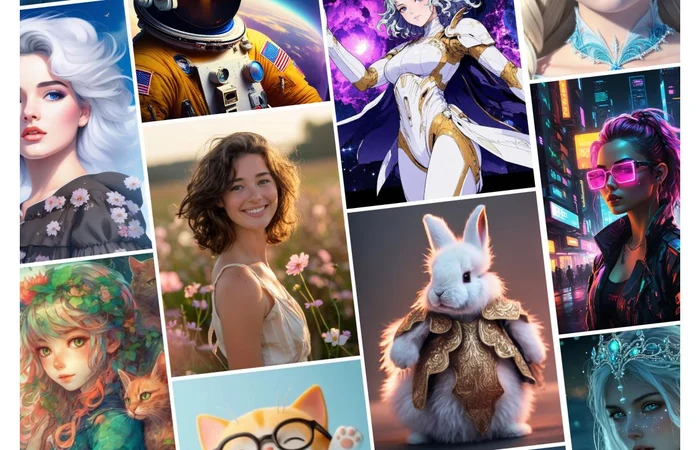
While some tools do different things, these features are most useful to a creator:
- Image creation from text: Explains what a user wants to see from a picture. This allows non-artists to access the creation of a picture.
- Diverse artistic styles: Users can try their hands at any style of art that is supported by their model whether that is realistic photography, anime, digital painting, 3D art, illustration or abstract art.
- Some advanced tools offer generation settings for users to select. Aspect ratios, image size, sampling and other settings, model checkpoints, and other generation parameters can be used to better control the output.
- Image to image editing: Certain services allow reference images and generate Image variations, maintaining the visual aspect as much as possible.
- Some open weight systems can allow the experienced user to add models, use custom workflows and experiment with different generation methods.
These attributes make these tools useful to digital artists, bloggers, designers and content writers.
Popular Approaches to AI Image Generation
Not every image generator provides the same level of flexibility. Understanding the available approaches makes it easier to choose an appropriate tool.
| Platform or approach | Main capability | Flexibility |
| Adobe Firefly | AI-assisted creative design and image generation | Controlled |
| Stable Diffusion | Customisable image generation models | High, depending on model and setup |
| ComfyUI | Node-based AI image generation workflows | Very high |
| Browser-based AI generators | Convenient image creation without installation | Depends on provider |
Adobe Firefly is geared towards content creators and published ethical guidelines are available for responsible use. Stable Diffusion allows for model customization, and ComfyUI enables more control over the creation process for technically advanced users.
But of course that does not mean a model license is acceptable and policy for the platform itself. Just because a model is running locally does not mean it is open to all purposes.
How Does the Image Generation Workflow Work?
The majority of AI image generators are based on machine learning models that have been trained to identify patterns in visual and text data.
The workflow goes as follows:
- Step 1: Enter a prompt: Define the type of image you wish to generate. Tell us about the subject, context, lighting, colours, art style and composition.
- Step 2: Select a model: Select among the available models that reflect the kind of picture you want. For example, certain models perform well with photographs, while others are more appropriate for illustrator or drawing art.
- Step 3: Change image settings: Choose the aspect ratio, resolution, generation steps and other options depending on the software.
- Step 4: Generate the image: The AI generates the image from the prompt. This can take a few seconds or several minutes depending on the model and hardware.
- Step 5: Review and revise: Notice the output has mistakes, missing object, broken object, misspellings of text and unwanted objects. Adjust the prompt or change to a different model.
Benefits and Limitations
These tools can reduce the time required to create visual content, but their results should not be treated as automatically publication-ready.
| Benefits | Limitations |
| Faster visual content creation | Results may contain visual errors |
| More artistic experimentation | Output quality varies between models |
| Useful for beginners and professionals | Advanced setups require technical knowledge |
| Flexible image customization | Some tools have usage restrictions |
| Helpful for blog and marketing visuals | Copyright and privacy concerns remain |
For instance, a blogger may take a conceptual photo for an article without arranging a photoshoot. But the image may contain wrong text, unnatural hand or objects. Manual quality control and editing is still valuable.
Who Can Use an Unrestricted AI Image Generator?
These sources may also be used for:
- Bloggers and publishers: They are responsible for drawing or posting illustration images and other supporting graphics for informational posts.
- Digital artists: Artists are able to try out compositions, visual styles and design concepts before finalising a design.
- Marketing Professionals: Can help develop initial ideas for advertising, graphics used in social media, as well as presentation plans.
- For students and teachers: Images produced by AI may be useful for making sense of concepts and supporting visual literacy if the images are applied appropriately.
- Developers and technical users: Open-weight models and custom workflows can be used for specialised image generation workflows.
Tips for Getting Better AI-Generated Images
An output’s quality is significantly influenced by the amount of clarity the task provides to obtain the intended result.
Describe what the AI should generate rather than give an overall instruction. For instance, instead of saying “generate an office,” describe a modern Indian office with a natural light from windows, minimal furniture, and at-least one green plant.
Also consider the following practices:
- Specify the main subject and background clearly.
- Mention the desired artistic style and lighting.
- Choose an appropriate aspect ratio for the intended platform.
- Generate multiple variations before selecting the final image.
- Check the output for inaccurate details and unwanted elements.
- Read the provider’s commercial-use and privacy policies.
A well-structured prompt can improve consistency, although it cannot guarantee a perfect result.
Conclusion
An unrestricted AI image generator may give people more leeway for digital artwork, illustrations, website imagery and visual experimentation. There are various customization options available, from easy-to-use browser-based generators to open-weight models and locally hosted workflows.
But that’s not where a generator search should stop. When selecting a generator, all these above-mentioned restrictions should be take into consideration. Image quality, privacy, licenses, ease of use and responsible image guidelines are these factors that is going to make a generator more transparent to a creative image.